How Does an AI Receptionist Handle Emergency Calls for Roofing and HVAC Companies?
Storm leaks, no heat, gas smells: how an AI receptionist should handle emergency calls for a roofing or HVAC company, what it must never do, and how to set up on-call.
What counts as an emergency for a roofing or HVAC company?
Every business draws the line differently, so write yours down. Typical examples:
- Roofing: water coming through a ceiling, storm or wind damage that has opened the roof, a tree or branch on the roof, missing sections of roof before more rain.
- HVAC: no heat in freezing weather, no cooling in extreme heat (especially with elderly people, babies or someone unwell in the home), water pouring from a unit, a burning smell from the system.
- Safety emergencies: a gas smell, a carbon monoxide alarm going off, sparks, smoke or fire. These need emergency services or the gas company first, not a contractor.
Just as useful is a list of what isn't urgent: quotes, maintenance visits, a noisy unit that still works, an annual service. Those can wait for office hours, and keeping them out of your urgent alerts means you'll trust the alerts when they come.
What should an AI receptionist do on an emergency call?
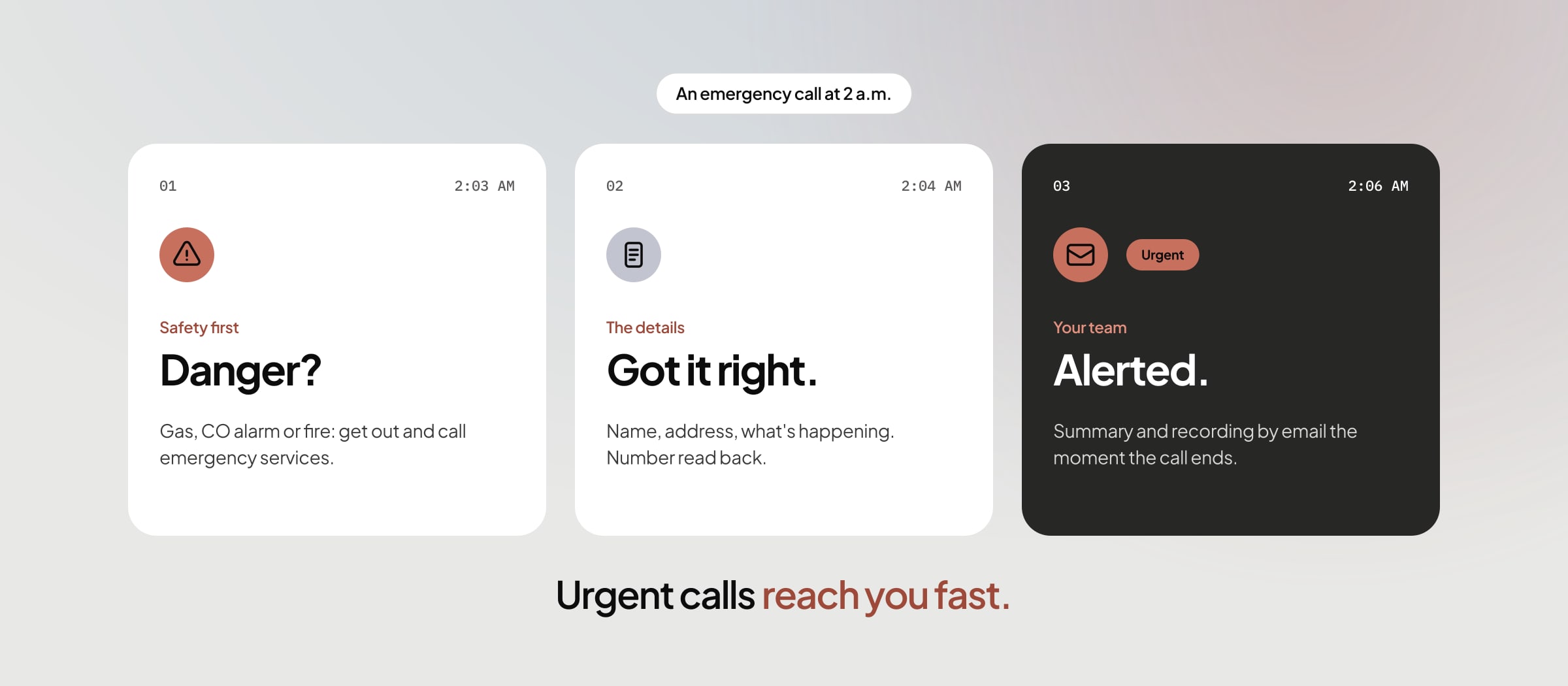
- Check for danger first. If the caller mentions gas, a carbon monoxide alarm, sparks, smoke or fire, give the safety message straight away, before anything else.
- Stay calm and short. One question at a time: name, the address of the job, what's happening, and the best number to call back.
- Read the number back. A wrong digit on an emergency call is the worst kind of mistake.
- Say honestly what happens next, for example: "I'm marking this urgent and passing it to the team right now." No arrival times unless your business has promised them.
- Mark the call urgent and alert the team as soon as the call ends, with the details and the recording.
Here's how that sounds in practice. A homeowner calls a roofing company late at night: "We had that storm and there's water coming through the bedroom ceiling." The receptionist says it's sorry, that it'll get this to the team, and asks for their name and the best number. It reads the number back in small groups, confirms the address, tells them the team has been alerted, and ends the call. A minute later, the owner's phone shows an email marked urgent with the summary and the recording.
What should it never do?
- Diagnose the problem or guess the cause. That's your technician's job.
- Tell the caller to fix anything themselves, especially anything involving gas or electricity.
- Tell someone it's safe to stay in a building that smells of gas or where a carbon monoxide alarm has gone off.
- Promise an arrival time, a price or a result your business hasn't agreed to.
- Keep a frightened caller on the line with long questions. Get the essentials and let them go.
What should it say about gas leaks, carbon monoxide or fire?
Keep it short and follow official local guidance. A few examples of what that guidance says:
- Gas smell in the US: leave the building right away, don't switch lights or appliances on or off, and call 911 or the gas company once you're outside.
- Gas smell in Great Britain: call the National Gas Emergency Service on 0800 111 999. Call 999 if there's immediate danger, such as a fire or explosion.
- Carbon monoxide alarm: get everyone, including pets, out into fresh air and call emergency services. Don't go back in until responders say it's safe.
- Sparks, smoke or fire: get out and call 911 in the US or 999 in the UK.
Agree the exact safety wording for your area before you go live, and keep it to one or two sentences. The receptionist's job is to point people to emergency services, not to give safety instructions of its own.
How does the alert reach you?
This is where emergency handling succeeds or fails. An AI receptionist can take a perfect message at 2 a.m., but if nobody sees it until 8, the customer has called someone else.
With Jane, every call ends with an email to your team: her summary, the confirmed call-back number and the recording. When the call is urgent, the subject line starts with [URGENT]. Every call also lands in your dashboard, with anything that needs a person flagged at the top.
To be clear about the limits: Jane doesn't phone your on-call technician, send anyone out, or put the caller through during the call. She makes sure the job reaches you fast and complete. So the last step is on your side: make sure those urgent emails reach whoever is on call, loudly. Most phones' email apps can give a sender or a subject its own alert sound that gets through do-not-disturb.
How do you set up an on-call plan around an AI receptionist?
- Write your urgent list: what counts as an emergency for your business, and what can wait until morning.
- Decide who's on call each night and weekend, and who covers if they don't respond.
- Route urgent alerts to the on-call phone, with an alert loud enough to wake someone.
- Set a call-back promise you can keep, such as "within 30 minutes", and have the receptionist promise no more than that.
- Agree the safety wording for gas, carbon monoxide and fire.
- Test it: call your own line at night with a fake emergency and time how long it takes someone to call back.
- Review urgent calls every week. Were they really urgent? Did anything urgent get missed? Adjust the rules.
Can an AI receptionist tell a real emergency from a routine call?
It goes by what the caller says and the rules you give it. "Water coming through the ceiling" or "no heat and it's freezing outside" are easy. Unclear calls are harder, so a good setup leans toward urgent when there's doubt: a call-back you didn't need to make costs a few minutes, while a missed emergency can cost the customer, the job and your reputation. When we set Jane up for a business, we agree its urgent list together and adjust it as real calls come in.
Frequently asked questions
Can an AI receptionist handle emergency calls?
Yes, if it's set up for them. It should put safety first, take the caller's name, address, number and what's happening, mark the call urgent and alert your team straight away. Your team still needs an on-call plan to respond.
What should an AI receptionist say if a caller smells gas?
It should tell them to leave the building and call emergency services or the gas company from outside, following official local guidance. In the US that's 911 or the gas company; in Great Britain it's the National Gas Emergency Service on 0800 111 999. It should never tell them it's safe to stay.
Will an AI receptionist send a technician out?
Not usually. Most AI receptionists, including Jane, take the details and alert your team; your team decides who goes and when. Some systems can transfer calls or page staff, so check what yours does.
How will I know about an emergency call at night?
With Jane, you get an email as soon as the call ends, with [URGENT] at the start of the subject line, plus the summary, call-back number and recording. Set your phone to give those emails a loud alert that gets through do-not-disturb.
Should an AI receptionist promise when someone will arrive?
No, unless your business has agreed a promise it can keep. It's better to say the team has been alerted and will call back, and to agree a realistic call-back time with your on-call staff.